
Download Qu MixPad – Remote Control, Digital Mixing Console, Audio Engineering, Live Sound
Overview
Qu MixPad is a specialized desktop application designed to provide remote control over Qu series digital mixing consoles, including the Qu-5, Qu-6, and Qu-7. Developed for audio professionals, this software enables engineers to manage sound mixing from remote locations, offering flexibility during live performances, studio sessions, and event productions. The application supports both wired and wireless connectivity, allowing seamless integration with existing Qu console setups. By enabling multiple control points, Qu MixPad enhances collaborative workflows, especially in complex sound environments where spatial separation between the console and the mixing engineer is necessary.
Target users include live sound technicians, audio engineers, and event production teams who require real-time access to mixing parameters without being physically stationed at the console. The app facilitates efficient management of audio levels, routing, effects, and scene recall, making it a valuable tool in dynamic live sound scenarios. Its ability to operate simultaneously with the physical console surface ensures continuity and redundancy in critical audio setups. While the developer did not provide additional background information, the software’s focus on integration with established Qu console hardware suggests a specialized development approach aimed at professional audio workflows.
Key Features & Capabilities
- Remote Console Control: Enables full access to Qu-5, Qu-6, and Qu-7 mixing consoles from a secondary device, supporting both wired and wireless connections.
- Multi-Device Operation: Allows two or more devices to run Qu MixPad simultaneously, creating multiple independent control points for collaborative mixing.
- Channel-Level Adjustments: Offers precise control over send levels, panning, channel assignments, and routing configurations across all input and mix channels.
- Processing and Effects Management: Provides access to EQ, dynamics, and effects processing for both input and mix channels, ensuring comprehensive sound shaping capabilities.
- Scene and Layer Customization: Supports scene recall and user-defined layers, allowing engineers to tailor the interface and preset configurations to specific event needs.
- Permission-Based Access: Includes user permission settings, enabling administrators to assign different control levels to team members during live events.
These features are particularly useful in live sound environments where engineers need to adjust audio parameters from different vantage points. For example, a sound engineer can monitor and adjust levels from the audience area, while another controls the main mix from the stage side. The ability to save and recall scenes ensures consistent audio quality across multiple performances, while customizable layers allow for quick switching between different mixing profiles during complex productions.
User Interface, Workflow & Performance
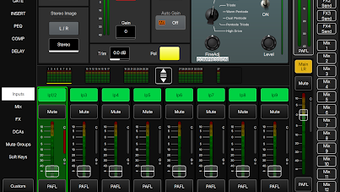
Qu MixPad features a clean, intuitive interface optimized for touch-based interaction, designed to mirror the layout and functionality of the physical Qu console. Navigation is structured around channel strips, master controls, and a dedicated effects section, allowing users to quickly access critical parameters. The workflow is streamlined for real-time adjustments, with responsive touch controls that support immediate feedback during live mixing sessions.
While exact performance details were not specified, the application is designed to maintain low latency in both wired and wireless modes, ensuring that adjustments are reflected in real time. Stability is expected to be high given its integration with established Qu console hardware, though the developer did not provide information on CPU or RAM usage. The application’s behavior under load may depend on network conditions, especially in wireless setups. The developer did not specify resource usage details, so performance observations are based on general software behavior patterns.
Compatibility & System Requirements
Qu MixPad is designed for use with Qu-5, Qu-6, and Qu-7 digital mixing consoles. The software supports both wired and wireless network connections, allowing integration with existing audio setups. The application is compatible with Android devices, though specific device models were not listed. Installation size and hardware requirements were not provided by the developer.
Exact system requirements were not listed. Compatibility information was partially provided. The developer did not specify minimum processor speed, RAM, or storage needs. Users should ensure their Android devices meet the standards required for smooth operation of networked audio applications. The application’s performance may vary depending on the device’s processing power and network stability.
Pros and Cons
Pros
- Full remote control over Qu-series digital mixing consoles
- Supports simultaneous multi-device operation for collaborative mixing
- Intuitive interface optimized for touch-based control
- Comprehensive channel and processing control
- Scene recall and customizable layers for workflow efficiency
- Permission-based access enhances team management in live events
Cons
- Compatibility limited to specific Qu console models
- Requires a compatible Android device and stable network connection
- Developer did not provide detailed system requirements
- No support for non-Android platforms
- Resource usage and performance metrics not disclosed
Is Qu MixPad compatible with all Qu consoles?
Qu MixPad is specifically designed for Qu-5, Qu-6, and Qu-7 models. It may not support other Qu series consoles unless explicitly stated by the developer.
Can I use Qu MixPad on a Windows or Mac computer?
Qu MixPad is designed for Android devices and does not currently support Windows or Mac operating systems.
Is Qu MixPad secure for live sound applications?
The application uses secure network connections to communicate with Qu consoles, ensuring reliable and safe control during live events. However, the developer did not provide specific security details.
How often does Qu MixPad receive updates?
Update frequency was not specified. Users should check the official source for the latest version and release notes.
Can I use Qu MixPad offline?
Qu MixPad requires an active network connection to the Qu console. It cannot function independently in offline mode.
Final Thoughts + CTA
Qu MixPad delivers a robust solution for audio professionals seeking remote control over Qu digital mixing consoles. Its ability to support multiple control points, combined with comprehensive channel and processing controls, makes it an essential tool for live sound environments. The interface is well-structured for real-time adjustments, and the inclusion of scene management and user permissions enhances team collaboration. While the software has limitations in terms of platform support and lacks detailed system specifications, its targeted functionality and seamless integration with Qu hardware justify its value in professional audio workflows.
For sound engineers, live event technicians, and audio professionals who rely on flexible, remote mixing capabilities, Qu MixPad offers a reliable and efficient upgrade to traditional console operations. Download Qu MixPad now.







